Motion model examples
1. Motion model
Summary of currently implemented motion models
The available models, their parameters and their position equations are tabulated in the Motion models page of the documentation. This notebook demonstrates using them.
Examples on using flystar.MotionModel:
%load_ext autoreload
%autoreload 2
%matplotlib inline
Imports
import numpy as np
import matplotlib.pyplot as plt
from flystar import motion_model
from flystar.startables import StarTable
from flystar.motion_model import Empty, Fixed, Linear, Acceleration, Parallax
Prepare data
t = np.array([0, 1., 2.2, 3.5, 5.]) + 2020.0
x = np.array([0., 0.5, 2.1, 3.2, 8.0])
y = np.array([10.2, 8.5, 9.1, 10.5, 13.0])
xe = np.array([0.2, 0.5, 0.3, 0.4, 0.6])
ye = np.array([0.3, 0.2, 0.5, 0.2, 0.4])
t_test = np.linspace(2020.0, 2025.0, 100)   # Test times for model evaluation
1.1. Example: linear model fit
mm = Linear()
params, param_errs = mm.fit(t, x, y, xe, ye)
Evaluate model at time t:
x_model, y_model = mm.get_predicted_positions(t, params)
Or if uncertainties of parameters is provided at the same time, the model will return the model uncertainties as well:
x_model, y_model, xe_model, ye_model = mm.get_predicted_positions(t, params, param_errs)
Note that we did not provide the fixed_params_dict parameter in the model function, so the MotionModel will use the saved self.fixed_params_dict. One can also specify the fixed_params_dict as:
mm.fixed_params_dict
{'t0': np.float64(2022.0454838983064)}
x_model, y_model, xe_model, ye_model = mm.get_predicted_positions(t_test, params, param_errs, mm.fixed_params_dict)
Define a helper function to visualize result
def visualize_fit(t, x, y, xe, ye, x_model, y_model, xe_model, ye_model, mm_name, t_test=None):
    if t_test is None:
        t_test = t
    x = np.atleast_2d(x)
    y = np.atleast_2d(y)
    xe = np.atleast_2d(xe)
    ye = np.atleast_2d(ye)
    x_model = np.atleast_2d(x_model)
    y_model = np.atleast_2d(y_model)
    xe_model = np.atleast_2d(xe_model)
    ye_model = np.atleast_2d(ye_model)

    N_cases = x.shape[0]
    fig, (ax1, ax2) = plt.subplots(1, 2, figsize=(10, 5))
    for i in range(N_cases):
        l0 = ax1.errorbar(t, x[i], yerr=xe[i], fmt='o', color=f'C{i%10}', label='Data')
        l1, = ax1.plot(t_test, x_model[i], label=f'{mm_name} Fit')
        l2 = ax1.fill_between(t_test, x_model[i] - xe_model[i], x_model[i] + xe_model[i], color=f'C{i%10}', alpha=0.3, label='Model Uncertainty')

        r0 = ax2.errorbar(t, y[i], yerr=ye[i], fmt='o', color=f'C{i%10}', label='Data')
        r1, = ax2.plot(t_test, y_model[i], label=f'{mm_name} Fit')
        r2 = ax2.fill_between(t_test, y_model[i] - ye_model[i], y_model[i] + ye_model[i], color=f'C{i%10}', alpha=0.3, label='Model Uncertainty')
    ax1.set_xlabel('Time')
    ax1.set_ylabel('X Position')
    ax1.set_title(f'{mm_name} Motion Model Fit')
    ax1.legend(
        [l0, (l1, l2)],
        ['Data', 'Model Fit'],
    )

    ax2.set_xlabel('Time')
    ax2.set_ylabel('Y Position')
    ax2.set_title(f'{mm_name} Motion Model Fit')
    ax2.legend(
        [r0, (r1, r2)],
        ['Data', 'Model Fit'],
    )
    plt.tight_layout()
    plt.show()
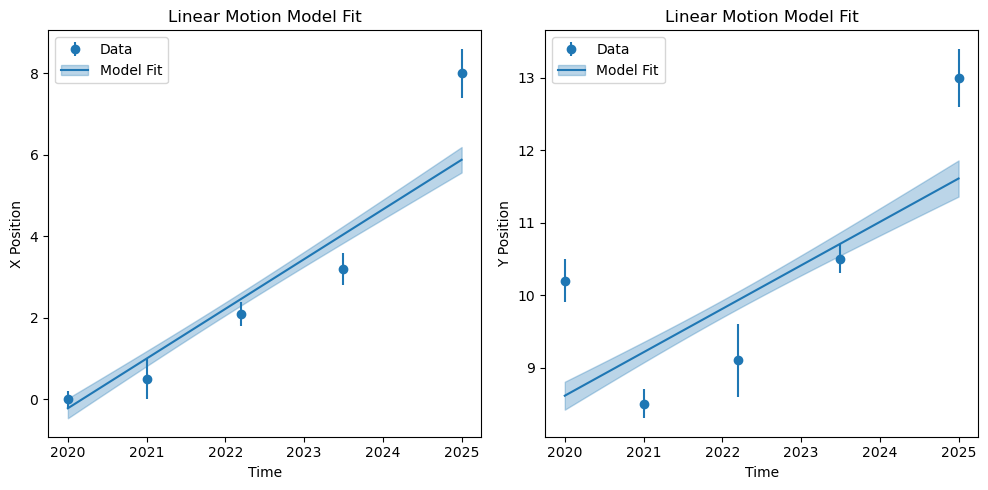
visualize_fit(t, x, y, xe, ye, x_model, y_model, xe_model, ye_model, mm.name, t_test)
1.2. Example: acceleration model fit
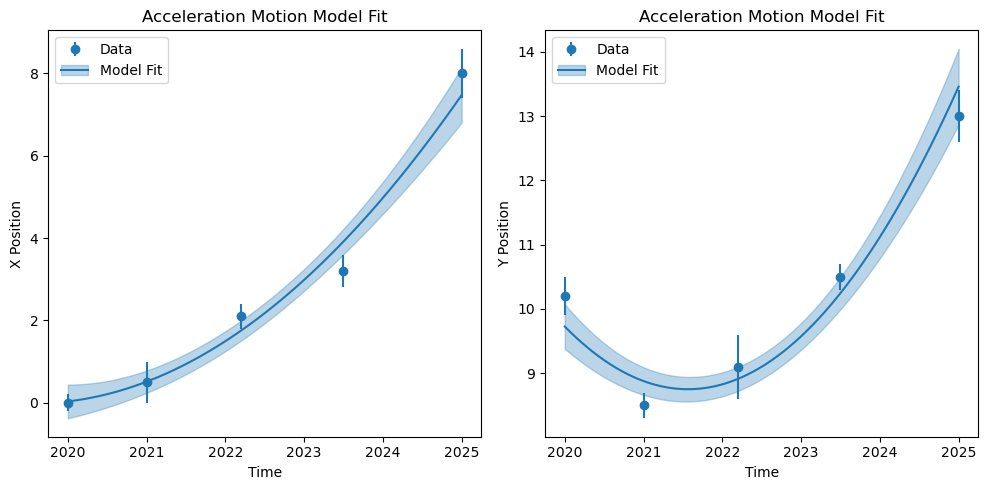
Upon further inspection, acceleration model seems to be a better representation of the data
mm = Acceleration()
params, param_errs = mm.fit(t, x, y, xe, ye)
x_model, y_model, xe_model, ye_model = mm.get_predicted_positions(t_test, params, param_errs)
visualize_fit(t, x, y, xe, ye, x_model, y_model, xe_model, ye_model, mm.name, t_test)
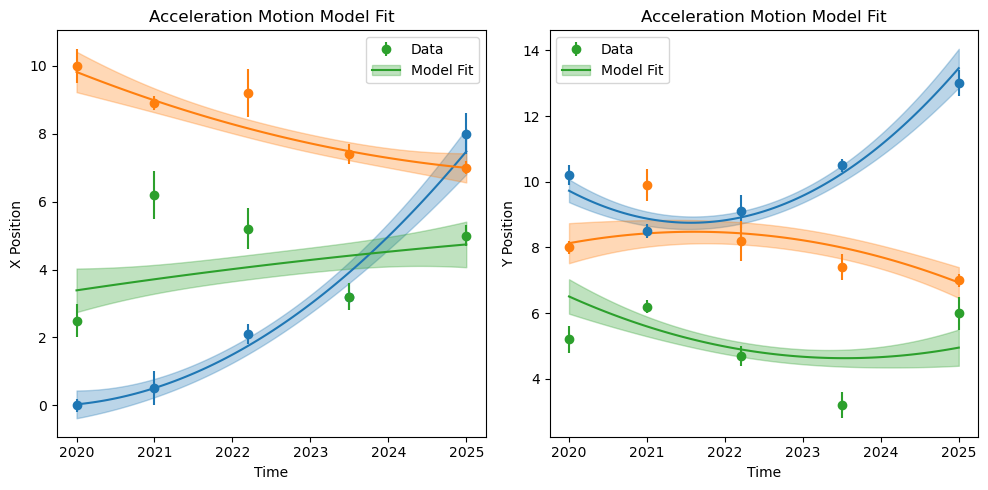
Moreover, MotionModel.get_predicted_positions is fully vectorized, and can infer positions of multiple stars at multiple times, and the resulting inferred positions has shape (N_stars, N_times). See the example below:
xs = np.array([
    [0., 0.5, 2.1, 3.2, 8.0],
    [10.0, 8.9, 9.2, 7.4, 7.0],
    [2.5, 6.2, 5.2, 3.2, 5.0]
])

ys = np.array([
    [10.2, 8.5, 9.1, 10.5, 13.0],
    [8.0, 9.9, 8.2, 7.4, 7.0],
    [5.2, 6.2, 4.7, 3.2, 6.0]
])

xes = np.array([
    [0.2, 0.5, 0.3, 0.4, 0.6],
    [0.5, 0.2, 0.7, 0.3, 0.2],
    [0.5, 0.7, 0.6, 0.4, 0.3]
])

yes = np.array([
    [0.3, 0.2, 0.5, 0.2, 0.4],
    [0.2, 0.5, 0.6, 0.4, 0.2],
    [0.4, 0.2, 0.3, 0.4, 0.5]
])
# fit() is vectorized across stars: hand it 2D (n_stars, n_epochs) arrays
# and every star is solved in one closed-form call -- no Python loop.
#
# Two things differ from the single-star call above:
#   * t must be 2D as well; fit() dispatches on t.ndim.
#   * the batch path does not fill in t0 for you, so pass it explicitly.
t2d = np.broadcast_to(t, xs.shape)
t0 = np.average(t2d, weights=1. / np.hypot(xes, yes), axis=1)

# The batch path also returns chi2 alongside the parameters, plus a
# diagnostics dict (empty except for Orbit) as a fifth value.
params, param_errs, chi2_x, chi2_y = mm.fit(
    t2d, xs, ys, xes, yes, fixed_params_dict={'t0': t0}
)[:4]
Once we have the params and param errors, we can infer the model positions at any given time.
# model() needs t0 too: self.fixed_params_dict is only remembered by the
# single-star path, so pass the same t0 the batch fit used.
x_model, y_model, xe_model, ye_model = mm.get_predicted_positions(t_test, params, param_errs, {'t0': t0})
The inferred positions should have shape (N_stars, N_times):
x_model.shape
(3, 100)
visualize_fit(t, xs, ys, xes, yes, x_model, y_model, xe_model, ye_model, mm.name, t_test)
1.3. Example: parallax model fit
Parallax model requires some fixed parameters: ra, dec, pa, obsLocation, and t0.
raanddecare required parameters.pa = 0by defaultobsLocation = 'earth'by defaultt0 = np.average(t, 1./np.hypot(xe, ye))by default
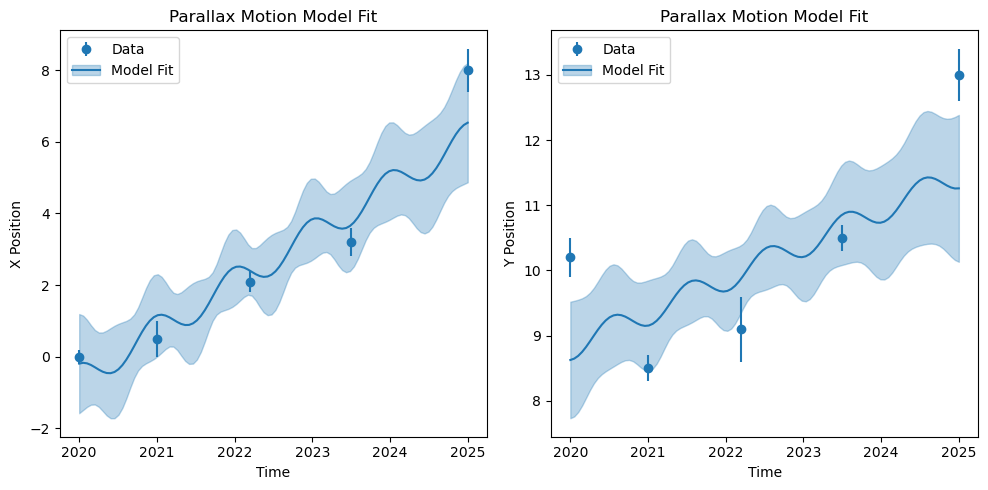
We need to provide the fixed parameters in the fixed_params_dict. Also, since we made up this data, the deviation from the parallax model is quite large. So we will choose absolute_sigma=False to rescale the uncertainties.
mm = Parallax()
fixed_params_dict = {'ra': 0., 'dec': 10., 'pa': 0., 'obsLocation': 'earth'}
params, param_errs = mm.fit(t, x, y, xe, ye, fixed_params_dict, absolute_sigma=False)
x_model, y_model, xe_model, ye_model = mm.get_predicted_positions(t_test, params, param_errs)
visualize_fit(t, x, y, xe, ye, x_model, y_model, xe_model, ye_model, mm.name, t_test)
2. Fit motion model in StarTable
Examples on flystar.StarTable.fit_motion_models. Prepare the data with invalid values:
x = np.array([
    [0., 0.5, 2.1, 3.2, 8.0],                   # Increasing 5 Epochs
    [10.0, 8.9, 9.2, 7.4, 7.0],                 # Decreasing 5 Epochs
    [2.5, np.nan, 5.2, np.nan, 5.0],            # 3 Epochs
    [np.nan, 6.2, np.nan, np.nan, 9.2],         # 2 Epochs
    [np.nan, 2.0, np.nan, np.nan, np.nan],      # 1 Epoch
    [np.nan, np.nan, np.nan, np.nan, np.nan]    # All NaNs
])

y = np.array([
    [10.2, 8.5, 9.1, 10.5, 13.0],               # Increasing 5 Epochs
    [8.0, 9.9, 8.2, 7.4, 7.0],                  # Decreasing 5 Epochs
    [5.2, np.nan, 4.7, np.nan, 6.0],            # 3 Epochs
    [np.nan, 1.2, np.nan, np.nan, 3.2],         # 2 Epochs
    [np.nan, 2.0, np.nan, np.nan, np.nan],      # 1 Epoch
    [np.nan, np.nan, np.nan, np.nan, np.nan]    # All NaNs
])

xe = np.array([
    [0.2, 0.5, 0.3, 0.4, 0.6],
    [0.5, 0.2, 0.7, 0.3, 0.2],
    [0.5, np.nan, 0.6, np.nan, 0.3],
    [np.nan, 0.6, np.nan, np.nan, 0.3],
    [np.nan, 0.4, np.nan, np.nan, np.nan],
    [np.nan, np.nan, np.nan, np.nan, np.nan]
])

ye = np.array([
    [0.3, 0.2, 0.5, 0.2, 0.4],
    [0.2, 0.5, 0.6, 0.4, 0.2],
    [0.7, np.nan, 0.5, np.nan, 0.2],
    [np.nan, 0.4, np.nan, np.nan, 0.5],
    [np.nan, 0.5, np.nan, np.nan, np.nan],
    [np.nan, np.nan, np.nan, np.nan, np.nan]
])

x = np.ma.masked_invalid(x)
y = np.ma.masked_invalid(y)
xe = np.ma.masked_invalid(xe)
ye = np.ma.masked_invalid(ye)
mask = np.ma.getmaskarray(x) | np.ma.getmaskarray(y) | np.ma.getmaskarray(xe) | np.ma.getmaskarray(ye)

tab = StarTable({
    'x': x,
    'y': y,
    'xe': xe,
    'ye': ye
})
tab.meta['list_times'] = t
There are a 2 ways to specify the desired motion models:
Let MotionModel automatically determine which motion model to use among the given
motion_modelslist based on the number of valid observations. MotionModel will choose the motion model that has enough observations, i.e. \(n_\text{fit} \geq n_\text{params}\).Specify a motion model for each star in the
motion_model_inputcolumn. In case there is not enough observations, MotionModel will “downgrade” to a model with less parameters until \(n_\text{fit} \geq n_\text{params}\) among all the unique motion models specified in the column.
Note that when absolute_sigma=False and n_fit == n_params, we don’t have enough degree of freedom to rescale the uncertainties, so the uncertainties will be set to infinity – the same behavior as scipy.optimize.curve_fit.
By default motion_models = [Empty, Fixed, Linear]. Empty and Fixed will always be added in the list to handle 0 and 1 point cases. See examples below for details. Let’s start with the most basic usage.
2.1. Example: default fitting
tab.fit_motion_models()
Fitting Empty motion model: vectorized batch fit for 1 star(s)
Fitting Fixed motion model: vectorized batch fit for 1 star(s)
Fitting Linear motion model: vectorized batch fit for 4 star(s)
Since we do not specify the motion_models parameter in the fit_motion_models function, the default motion model of Empty, Fixed and Linear will be used. The function automatically determines which motion models among the three to use based on the number of valid observations, i.e., \(n_\text{fit} \geq n_\text{params}\):
tab['n_required'] = 2
tab[['n_fit', 'n_required', 'motion_model_used']]
| n_fit | n_required | motion_model_used |
|---|---|---|
| int64 | int64 | str20 |
| 5 | 2 | Linear |
| 5 | 2 | Linear |
| 3 | 2 | Linear |
| 2 | 2 | Linear |
| 1 | 2 | Fixed |
| 0 | 2 | Empty |
Next, let’s try absolute_sigma=False. As mentioned above, we don’t have enough degree of freedom to rescale the uncertainties for the forth star. In this case, the parameter uncertainties will be set to infinity, which is the same behavior as scipy.optimize.curve_fit. The same OptmizieWarning as in scipy will be raised.
tab.fit_motion_models(absolute_sigma=False)
Fitting Empty motion model: vectorized batch fit for 1 star(s)
Fitting Fixed motion model: vectorized batch fit for 1 star(s)
Fitting Linear motion model: vectorized batch fit for 4 star(s)
/Users/lwei-local/Software/flystar/flystar/motion_model.py:346: OptimizeWarning: Degree of freedom <= 0 for some star(s). Covariance of the parameters could not be estimated. Setting parameter uncertainties to np.inf.
  result = self.run_fit(
tab['vx_err']
| 0.23980256894092755 |
| 0.07197698078673949 |
| 0.2672310900442148 |
| inf |
| inf |
| inf |
2.2. Example: specify motion models
Alternatively, one can specify a list of motion models to use, and the function will also automatically determine which model to use for each star depending on the valid observed epochs. In the following example, we specify Acceleration model, but the function will always implicitly add Empty and Fixed to handle the 0 or 1 epoch stars.
tab.fit_motion_models(motion_models=['Acceleration'])
Fitting Acceleration motion model: vectorized batch fit for 3 star(s)
Fitting Empty motion model: vectorized batch fit for 1 star(s)
Fitting Fixed motion model: vectorized batch fit for 2 star(s)
tab[['n_fit', 'motion_model_used']]
| n_fit | motion_model_used |
|---|---|
| int64 | str20 |
| 5 | Acceleration |
| 5 | Acceleration |
| 3 | Acceleration |
| 2 | Fixed |
| 1 | Fixed |
| 0 | Empty |
2.3. Example: specify the motion_model_input column
One can also specify a motion model for each star as a column in the star table. However, the function will “downgrade” the model to one with fewer parameters until \(n_\text{fit} \geq n_\text{params}\):
ra = np.zeros(len(x))
dec = np.zeros(len(x))
pa = np.zeros(len(x))

motion_model_input = [
    'Acceleration', # Will use Acceleration
    'Parallax',     # Will use Parallax
    'Linear',       # Will use Linear
    'Acceleration', # Will use Linear, as n_fit = 2 < 3
    'Linear',       # Will use Fixed, as n_fit = 1 < 2
    'Fixed'         # Will use Empty, as n_fit = 0 < 1
]
tab = StarTable({
    'x': x,
    'y': y,
    'xe': xe,
    'ye': ye,
    'ra': ra,
    'dec': dec,
    'pa': pa,
    'motion_model_input': motion_model_input
})
tab.meta['list_times'] = t
tab.fit_motion_models(fixed_params_dict={
    'ra': ra,
    'dec': dec,
    'pa': pa,
    'obsLocation': 'earth'
})
Fitting Acceleration motion model: vectorized batch fit for 1 star(s)
Fitting Empty motion model: vectorized batch fit for 1 star(s)
Fitting Fixed motion model: vectorized batch fit for 1 star(s)
Fitting Linear motion model: vectorized batch fit for 2 star(s)
Fitting Parallax motion model: vectorized batch fit for 1 star(s)
Let’s check if the actually used motion model is corrected:
all_mm_map = motion_model.motion_model_map()
tab['n_required'] = np.array([all_mm_map[mm].n_params for mm in tab['motion_model_input']], dtype=int)
tab[['n_fit', 'n_required', 'motion_model_input', 'motion_model_used']]
| n_fit | n_required | motion_model_input | motion_model_used |
|---|---|---|---|
| int64 | int64 | str12 | str12 |
| 5 | 3 | Acceleration | Acceleration |
| 5 | 3 | Parallax | Parallax |
| 3 | 2 | Linear | Linear |
| 2 | 3 | Acceleration | Linear |
| 1 | 2 | Linear | Fixed |
| 0 | 1 | Fixed | Empty |
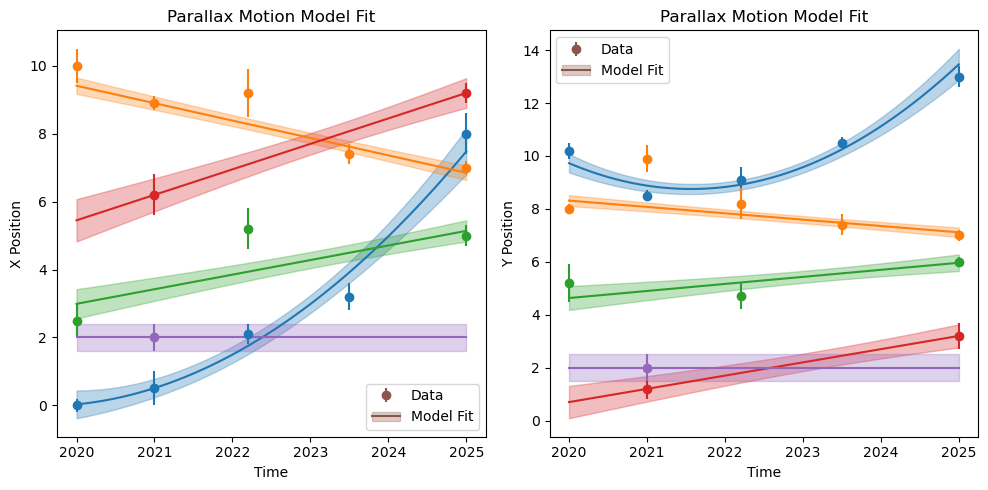
2.4. Example: infer positions
Continuing from the previous example: Once we fit the motion models and the parameters are added into the table, we can infer the positions at arbitrary times with StarTable.get_predicted_positions
x_model, y_model, xe_model, ye_model = tab.get_predicted_positions(t_test)
As in MotionModel.get_predicted_positions, StarTable.get_predicted_positions is also vectorized and returns positions and uncertainties in shapes of \((N_\text{stars}, N_\text{times})\)
x_model.shape
(6, 100)
visualize_fit(t, x, y, xe, ye, x_model, y_model, xe_model, ye_model, mm.name, t_test)
2.5. Example: freezing specific stars with update_ref_motion
When using MosaicToRef, you can freeze individual stars so their positions
and motion-model parameters are never updated during alignment – regardless
of the update_ref_orig setting. Set the boolean column update_ref_motion
to False on those stars in your reference list.
Stars with update_ref_motion=True (the default) follow the normal
update_ref_orig policy. Stars without the column are treated as True.
Stars newly added to the reference frame during alignment always start as True.
import numpy as np
from flystar import startables

# Suppose ref_list is a StarTable from a previous alignment pass
# (here we build a minimal one for illustration).
# Per-epoch columns are 2D, shape (n_stars, n_epochs); here one epoch.
n = 10
rng = np.random.default_rng(0)
ref_list = startables.StarTable(
    name=[f'star{i}' for i in range(n)],
    x=rng.uniform(0, 100, (n, 1)),
    y=rng.uniform(0, 100, (n, 1)),
    m=rng.uniform(12, 18, (n, 1)),
    xe=np.full((n, 1), 0.001),
    ye=np.full((n, 1), 0.001),
    me=np.full((n, 1), 0.01),
    t=np.full((n, 1), 2020.0),
)
print('update_ref_motion column after StarTable construction:',
      ref_list['update_ref_motion'])
Because StarTable always injects the update_ref_motion column on
construction (defaulting every star to True), you simply flip the entries
you want frozen:
# Freeze the first two stars -- e.g. high-quality Gaia anchor stars
anchor_indices = [0, 1]
ref_list['update_ref_motion'][anchor_indices] = False

print('update_ref_motion after freezing:', ref_list['update_ref_motion'])
# Stars 0 and 1 are now False (frozen); the rest remain True (refittable)
Pass this ref_list to MosaicToRef. Frozen stars keep their
positions and motion parameters on every iteration, making them reliable
anchor points while the rest of the catalog evolves:
Interaction with update_ref_orig:
|
|
Behaviour |
|---|---|---|
|
|
Whole catalog frozen (Gaia / absolute-frame mode) |
|
|
Star updates each iteration |
|
|
This star stays frozen; all others evolve |
|
|
Star frozen by both controls (redundant, fine) |
The per-star update_ref_motion=False always takes precedence over
update_ref_orig, so anchor stars can be locked even when the rest of
the catalog is set to update freely.